> ## Documentation Index
> Fetch the complete documentation index at: https://qovery-docs-karpenter-stable-toleration-and-metrics-profiles.mintlify.site/llms.txt
> Use this file to discover all available pages before exploring further.
# Deployment Pipeline
> Orchestrate service deployments with deployment stages
The deployment pipeline basically defines the operations that shall be performed to properly deploy every service defined within your environment.
## Overview
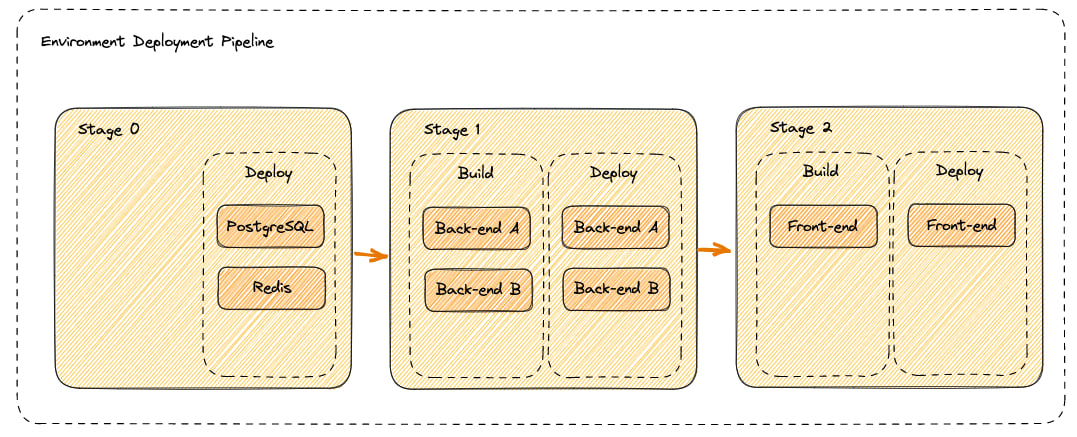
The deployment pipeline is composed of **Deployment Stages**. Each service within your environment belongs to exactly one deployment stage.
Deployment stages are ordered by execution priority - a stage with a lower order is executed before a stage with a higher order. This allows you to control the deployment sequence and manage dependencies between services.
 ## Pipeline Execution
### Build Phase
During the build phase:
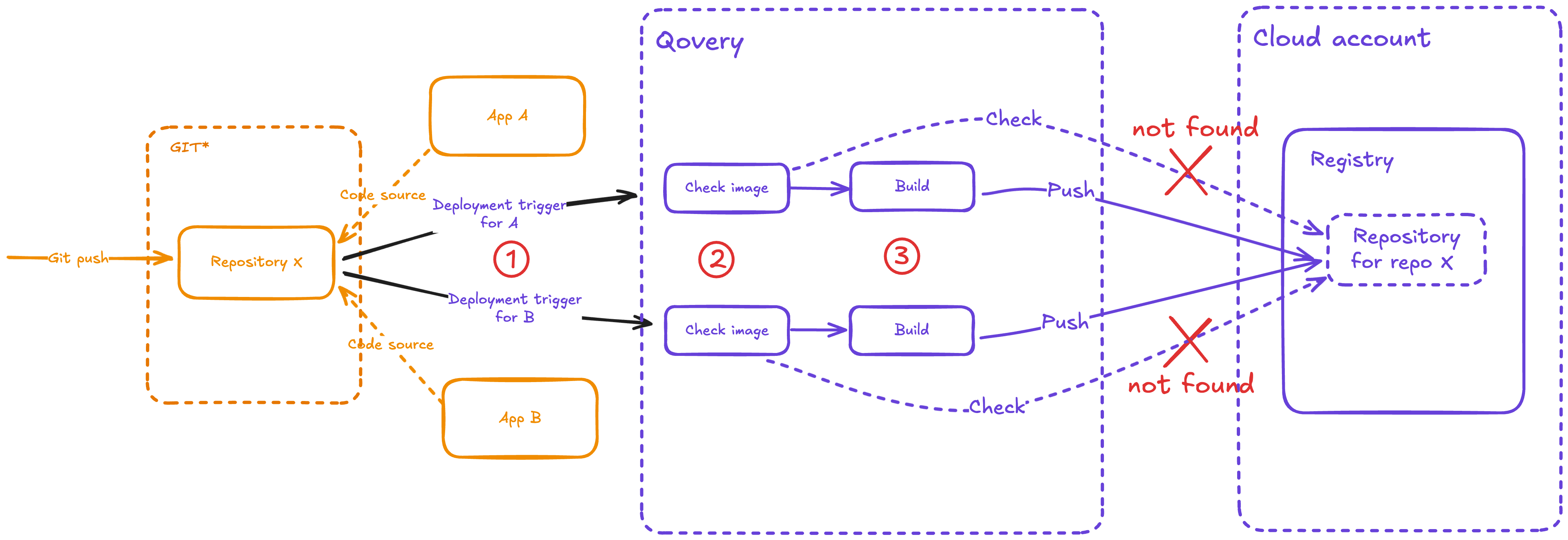
* **Qovery CI** downloads the repositories and generates container images
* **Maximum parallelism**: 7 builds can run simultaneously
* **Build resources**: Each build uses 4 CPU and 4 GB memory by default
* **Image storage**: Built images are pushed to the mirroring registry
* **Pre-built images**: Applications deployed from external CI/CD can bypass this step by using pre-built images from container registries
## Pipeline Execution
### Build Phase
During the build phase:
* **Qovery CI** downloads the repositories and generates container images
* **Maximum parallelism**: 7 builds can run simultaneously
* **Build resources**: Each build uses 4 CPU and 4 GB memory by default
* **Image storage**: Built images are pushed to the mirroring registry
* **Pre-built images**: Applications deployed from external CI/CD can bypass this step by using pre-built images from container registries
 ### Deployment Phase
During the deployment phase:
* **Qovery engine** manages deployment via Helm charts
* **Maximum parallelism**: 7 deployments can run simultaneously
* **Image retrieval**: Images are pulled from the mirroring registry
* **Chart generation**: Custom Helm charts are generated unless you provide your own
## Default Pipeline Structure
When you create a new environment, Qovery automatically creates four default deployment stages:
### Deployment Phase
During the deployment phase:
* **Qovery engine** manages deployment via Helm charts
* **Maximum parallelism**: 7 deployments can run simultaneously
* **Image retrieval**: Images are pulled from the mirroring registry
* **Chart generation**: Custom Helm charts are generated unless you provide your own
## Default Pipeline Structure
When you create a new environment, Qovery automatically creates four default deployment stages:
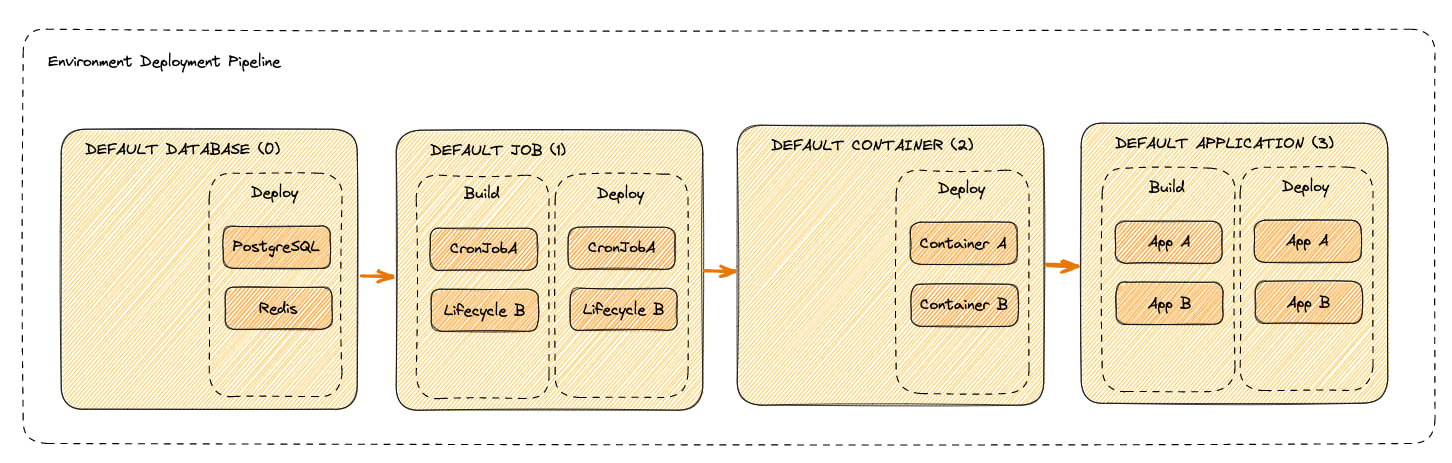 All database services are deployed in this stage
All job services (lifecycle jobs and cron jobs) are deployed in this stage
All container image deployments are deployed in this stage
All Git repository-based applications are deployed in this stage
You can modify these stages or create custom stages through your environment configuration.
## Performance Optimization
To optimize your deployment pipeline performance, consider the following strategies:
### Dockerfile Optimization
Review and optimize your Dockerfile structure following [Docker best practices](https://docs.docker.com/develop/dev-best-practices/):
* Use specific base image tags instead of `latest`
* Order Dockerfile commands from least to most frequently changed
* Leverage Docker layer caching
* Use multi-stage builds to reduce image size
* Copy dependency files separately to cache installations
### Maximize Parallelism
When services have no dependencies between them, place them in the same deployment stage to deploy them in parallel. This can significantly reduce overall deployment time.
### Multi-Stage Build Caching
If you have multiple applications that share the same base image or dependencies, deploy dependent applications to later stages. This allows Qovery to reuse already-built images and cache layers.
### Avoid Environment-Specific Build Variables
Don't use environment-specific values for the variables your Dockerfile declares, either as an `ARG NAME` or as the `id=NAME` of a `RUN --mount=type=secret` mount. Their values are part of the computed image tag, so a value that differs per environment causes Qovery to rebuild the image for each environment even when the code hasn't changed. Instead, use environment variables that are injected at runtime. See [Build-Time Variables](/configuration/environment-variables#build-time-variables).
## Skipped Services
You can exclude specific services from environment-level deployment actions by marking them as **skipped** in the deployment pipeline settings.
### How to Skip a Service
In your environment's **Pipeline**, drag a service into the **Skipped** column. Skipped services appear visually separated from the regular deployment stages.
### Behavior
* **Environment deployment actions** (deploy, stop, restart): Skipped services are **excluded** from the operation. They will not be built, deployed, stopped, or restarted when you trigger an environment-level action.
* **Environment delete**: Skipped services are **still deleted** along with the rest of the environment. The skipped status does not prevent deletion.
* **Service-level actions**: You can still deploy, stop, or restart a skipped service individually by triggering the action directly on that service.
* **Clone and Preview Environments**: When you clone an environment or create a preview environment, the skipped status is **inherited** by the cloned services. Services that were skipped in the source environment will also be skipped in the new environment.
### Use Cases
* **Temporarily disable a service** without removing it from the environment
* **Speed up deployments** by excluding services that don't need frequent updates
* **Reduce costs** by preventing unnecessary builds and deployments for stable services
## Managing Deployment Stages
You can customize your deployment pipeline by creating, modifying, or removing deployment stages from your environment configuration section.
## Next Steps
Learn how to control deployments
Monitor your deployments with logs
Configure deployment strategies
Optimize deployments with image mirroring
All database services are deployed in this stage
All job services (lifecycle jobs and cron jobs) are deployed in this stage
All container image deployments are deployed in this stage
All Git repository-based applications are deployed in this stage
You can modify these stages or create custom stages through your environment configuration.
## Performance Optimization
To optimize your deployment pipeline performance, consider the following strategies:
### Dockerfile Optimization
Review and optimize your Dockerfile structure following [Docker best practices](https://docs.docker.com/develop/dev-best-practices/):
* Use specific base image tags instead of `latest`
* Order Dockerfile commands from least to most frequently changed
* Leverage Docker layer caching
* Use multi-stage builds to reduce image size
* Copy dependency files separately to cache installations
### Maximize Parallelism
When services have no dependencies between them, place them in the same deployment stage to deploy them in parallel. This can significantly reduce overall deployment time.
### Multi-Stage Build Caching
If you have multiple applications that share the same base image or dependencies, deploy dependent applications to later stages. This allows Qovery to reuse already-built images and cache layers.
### Avoid Environment-Specific Build Variables
Don't use environment-specific values for the variables your Dockerfile declares, either as an `ARG NAME` or as the `id=NAME` of a `RUN --mount=type=secret` mount. Their values are part of the computed image tag, so a value that differs per environment causes Qovery to rebuild the image for each environment even when the code hasn't changed. Instead, use environment variables that are injected at runtime. See [Build-Time Variables](/configuration/environment-variables#build-time-variables).
## Skipped Services
You can exclude specific services from environment-level deployment actions by marking them as **skipped** in the deployment pipeline settings.
### How to Skip a Service
In your environment's **Pipeline**, drag a service into the **Skipped** column. Skipped services appear visually separated from the regular deployment stages.
### Behavior
* **Environment deployment actions** (deploy, stop, restart): Skipped services are **excluded** from the operation. They will not be built, deployed, stopped, or restarted when you trigger an environment-level action.
* **Environment delete**: Skipped services are **still deleted** along with the rest of the environment. The skipped status does not prevent deletion.
* **Service-level actions**: You can still deploy, stop, or restart a skipped service individually by triggering the action directly on that service.
* **Clone and Preview Environments**: When you clone an environment or create a preview environment, the skipped status is **inherited** by the cloned services. Services that were skipped in the source environment will also be skipped in the new environment.
### Use Cases
* **Temporarily disable a service** without removing it from the environment
* **Speed up deployments** by excluding services that don't need frequent updates
* **Reduce costs** by preventing unnecessary builds and deployments for stable services
## Managing Deployment Stages
You can customize your deployment pipeline by creating, modifying, or removing deployment stages from your environment configuration section.
## Next Steps
Learn how to control deployments
Monitor your deployments with logs
Configure deployment strategies
Optimize deployments with image mirroring